
These examples show how a fictional company used eiso features to find materials, create management system documents, keep operational records and provide on-site training, by industry, standard and size. The topic (angle) of the case changes every day, and there are 13 in all.
Finding evidence through information collection · Building a document system from scratch · Creating one procedure · Improving quality with writing instructions and reference materials · Related forms and writing examples · Refining documents with completeness check results · Integrating documents for each standard into one · Revising documents for a new edition · Running a year through the operation steps · Managing with operational data registers · Correcting nonconformities · Training materials to bring documents to the workplace · One flow from establishment to operation.
Each article includes what was entered in each field on screen, a preview of the output, tips for better results and "Check your own company too", so you can follow along as is. Below you can select by standard, size and industry.
- Cases are written by AI based on the day's topics (standard revision schedules, anniversaries, weekday themes) and the management system materials compiled by AGENT, and are posted after review by AGENT staff.
- Company and personal names are fictional, borrowed from historical figures, and have no relation to any real company or certification audit. Figures are examples; please check standard clauses and laws against the original text.
- eiso is only a tool that helps you write documents with AI and does not guarantee certification results. Refining documents to a level that can be certified is your company's responsibility. The documents in the cases are depicted as created by the company itself with eiso features and reviewed and approved by the company.
- To decide where to start, see the Management System Establishment Guide and the Management System Operation Guide; for what the output looks like, see the Management System Establishment and Management System Operation examples.
PixelMoment Co., Ltd. (fictional): from AI selection to risk assessment, impact assessment, documentation and monitoring for an AI photo studio, the ISO/IEC 42001 flow in six weeks
An AI photo studio with 25 employees and 8 stores compared three candidate AI solutions, assessed six risks and the impact on customers, specific groups and society, and decided to turn style conversion off for ID photos. It runs on eight documents and five indicators and reassesses whenever something changes. A fictional case for training.
This case is a fictional scenario for training purposes. The company, people and figures are all invented examples. Screen names and behaviour reflect eiso as of November 2026.
Case overview
PixelMoment Co., Ltd., a fictional company, used eiso alone to choose the AI for its AI photo studio, assess the risks and impacts, keep the results as documents and keep checking during operation. It built this system in six weeks. The case shows how a small service company actually walks through the core flow that ISO/IEC 42001 (AI management systems) requires.
| Item | Details |
|---|---|
| Company | PixelMoment Co., Ltd. (fictional), 25 employees, 8 stores |
| Service | AI photo studio "Moment Studio". Customers take photos in an unstaffed booth, then AI retouches them, composites backgrounds and converts styles (profile, ID photo, character style) |
| Data processed | Customer face photos, contact details (for sending photos), payment information |
| Background | Complaints about retouching quality, complaints that "the AI changes my face too much", concerns about photo retention and leaks, the need to respond to Korea's AI Basic Act in force from 2026-01-22 |
| What eiso covered | AI selection, risk assessment, system impact assessment, documentation, monitoring |
| Scope (AI role) | AI use (Company B's solution), AI provision (an AI retouching service offered to customers) |
| Criteria applied | ISO/IEC 42001:2023, ISO/IEC 23894:2023 (guidance on AI risk management), ISO/IEC 42005:2025 (AI system impact assessment), Korea's Personal Information Protection Act, AI Basic Act |
Put simply, the photo studio records and manages in one place "which AI to use, what problems that AI could cause customers, and what it does so those problems do not happen". eiso guides this as the steps of ICT Management System Operation, and each step takes over the result of the step before it, so the work flows on into documents.
The whole flow
The five stages form one flow in which the result of each stage becomes the input to the next. The numbers under the figure are the ISO/IEC 42001 clauses and Annex A control numbers each stage corresponds to.
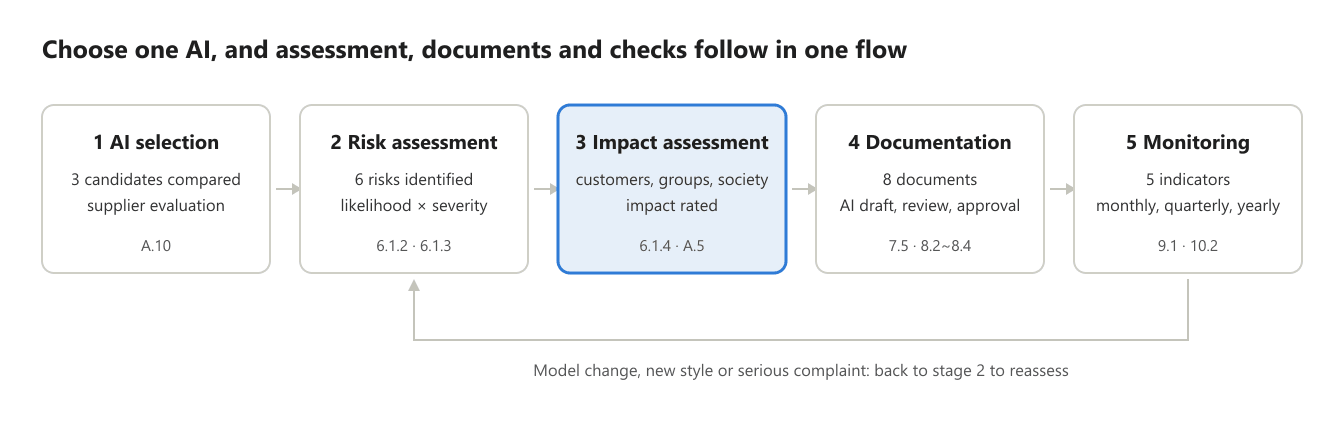
The highlighted stage 3 (impact assessment) produced the key decision in this case, and when something changes in stage 5 the company goes back to stage 2 to assess again. The five stages of the case correspond to the following steps of eiso ICT Management System Operation (ISO/IEC 42001, 17 steps).
| Case stage | eiso operation step | ISO/IEC 42001 |
|---|---|---|
| 1 AI selection | 3 AI System Selection, then 4 AI System Inventory | A.4, A.10 |
| 2 Risk assessment | 8 AI Risk Assessment, then 9 AI Risk Treatment | 6.1.2, 6.1.3, 8.2, 8.3 |
| 3 Impact assessment | 10 AI System Impact Assessment | 6.1.4, 8.4, A.5 |
| 4 Documentation | 11 Documented Information Control | 7.5 |
| 5 Monitoring | 12 Monitoring, Change and Revision Control, then 13 Internal Audit, 15 Management Review, 16 Nonconformity and Corrective Action | 9.1, 9.2, 9.3, 10.2 |
The source material (information on candidate AI, test results, complaint records, monthly indicators) stays in step folders on the company's own computer, and eiso reads the material in the folders the company designates to produce tables and draft documents.
Stage 1. AI selection
PixelMoment compared three candidate AI solutions and selected Company B's domestic cloud solution. It gave the largest weight not to price but to "where customer photos are stored and whether they are used for training" (ISO/IEC 42001 Annex A.10, third-party and customer relationships). In the Requests field of step 3 AI System Selection, it entered the three candidates and the comparison items and weights below, and received a comparison table.
| Criterion (weight) | Company A (free overseas API) | Company B (domestic cloud) | Company C (installed, on-premises) |
|---|---|---|---|
| Data protection, domestic storage (30%) | 2 (overseas servers, clause allowing training use) | 5 (domestic servers, contract excluding training use) | 5 (processed inside the store) |
| Retouching quality, naturalness (25%) | 4 | 4 | 3 |
| Variation by skin tone and age (15%) | 2 (no validation data) | 4 (test report provided) | 3 |
| Explanation, technical support (15%) | 2 | 4 | 3 |
| Cost (15%) | 5 | 3 | 2 (equipment investment needed) |
| Weighted total (out of 5) | 2.95 | 4.15 | 3.45 |
| Result | Rejected | Selected | Reserve |
After the selection, three things remain in eiso.
- AI system inventory (step 4): system name, purpose, AI role, supplier, data processed, people affected, owner (operations manager)
- Supplier requirements: no use for training, deletion within 30 days, notification within 24 hours of an incident, written into the contract
- Reassessment schedule: once a year and whenever the model changes
The score table is an example; the comparison items and weights are changed in the Requests field to suit the company.
Stage 2. AI risk assessment
The company found six risks with the selected AI, treated the four rated high (12 points or more) and brought all of them down to medium or below. Step 8 AI Risk Assessment takes over the step 4 AI System Inventory and builds the table in the order "what could go wrong, how often and how seriously, and how to prevent it" (ISO/IEC 42001 6.1.2 AI risk assessment, 6.1.3 AI risk treatment).
Method: risk score = likelihood (1 to 5) × severity (1 to 5). PixelMoment used the three-level criteria from its own risk assessment procedure: 12 or more is high (act now), 6 to 11 is medium (planned action), 5 or less is low (monitor). eiso follows the company's procedure when there is one; otherwise it uses its default four levels (1 to 6 low, 7 to 12 medium, 13 to 19 high, 20 to 25 critical, acceptance criterion 6 or less).
| No | Risk | Before treatment (likelihood × severity) | Treatment | After treatment |
|---|---|---|---|---|
| R1 | Leak or unauthorized reuse of customer face photos | 3×5 = 15 high | Encryption in transit and at rest, automatic deletion after 30 days, administrator access limited to two people | 2×5 = 10 medium |
| R2 | Excessive face alteration (ID photo that does not look like the person) | 4×3 = 12 high | Upper limit on retouching strength in ID photo mode, side-by-side comparison with the original before printing | 2×3 = 6 medium |
| R3 | Retouching quality varies by skin tone and age group (bias) | 3×4 = 12 high | Quarterly variation test on a sample of 100 photos, improvement requests to the supplier | 2×4 = 8 medium |
| R4 | Missing consent when photographing customers under 14 | 3×4 = 12 high | Age check screen, consent procedure for the legal guardian | 1×4 = 4 low |
| R5 | Not disclosing that the output is AI-generated | 3×3 = 9 medium | "AI retouched / generated" label on the booth screen and prints | 1×3 = 3 low |
| R6 | Business stops because the AI service fails | 2×3 = 6 medium | Automatic switch to a basic (non-AI) retouching mode | 1×3 = 3 low |
The CEO approved acceptance of the remaining risks (R1 to R3, medium), which were passed on to stage 5 monitoring. In step 9 AI Risk Treatment the treatments become a treatment plan with owners and deadlines, and in the same step the company produces the Statement of Applicability (SoA), giving for each Annex A control whether it applies and why. Because R1 scored 15, eiso passed this AI on to step 10 AI System Impact Assessment (eiso default rule: anything scoring 13 or more is held back from deployment until the impact assessment is finished).
Stage 3. AI system impact assessment
The impact assessment judged "the ID photo can no longer be used to identify the person" as the largest negative impact, so the company decided to turn style conversion off entirely for ID photos. Where risk assessment asks "what problems could the company face", impact assessment asks "what effect will this have on customers and society" (ISO/IEC 42001 6.1.4, Annex A.5; detailed method in ISO/IEC 42005). eiso step 10 rates seven areas (safety; fairness (bias); transparency and explainability; privacy; security; human oversight; social and environmental impact) as high, medium or low, and PixelMoment regrouped the results by who is affected.
| Affected | Expected impact | Type | Level | Decision or mitigation |
|---|---|---|---|---|
| Individual customers | ID photo differs from the real face, so a passport or ID card is refused | Negative | High | ID photo mode corrects only lighting and blemishes; no changes to face shape |
| Individual customers | Face photos used to train AI without consent | Negative | High | Supplier contract excluding training use, customer notice posted |
| Specific groups | Retouching looks less natural for darker skin tones and older people | Negative | Medium | Quarterly variation test (linked to R3) |
| Specific groups | Pressure from appearance standards on children and teenagers | Negative | Medium | Cosmetic reshaping menu hidden for under-14s |
| Society | AI-composited photos circulate as if they were real | Negative | Medium | "AI retouched / generated" label on prints (linked to R5) |
| Individual customers | Even quality in unstaffed stores, shorter waiting times | Positive | — | Keep and promote |
The impact assessment does not end with one round before launch. When a new style is added, the AI model is replaced or customer complaints arise, the change is recorded in step 12 and steps 8 and 10 are run again.
Stage 4. Documentation
Taking over the results of stages 1 to 3 together with the AI policy (step 2 AI Policy, Roles and Objectives) and the legal register (step 14 Legal Requirements Identification and Monitoring), eiso produced drafts of eight documents, and PixelMoment only reviewed and approved them. In step 11 Documented Information Control the documents receive numbers and a revision and approval history, so they can be shown as they are for audits, customer questions and requests from authorities.
| Document | Content | Linked stage | Related requirement |
|---|---|---|---|
| AI policy | Five principles for using AI, such as "a customer's face belongs to the customer" | All | ISO/IEC 42001 5.2 |
| AI system inventory | System, purpose, supplier, data, owner | Stage 1 | Annex A.4 (resources) |
| AI supplier evaluation | Comparison of candidates, reasons for selection, contract requirements | Stage 1 | Annex A.10 |
| AI risk assessment | Six risks, scores, acceptance approval | Stage 2 | 6.1.2, 8.2 |
| Risk treatment plan | Actions, owners, deadlines, completion | Stage 2 | 6.1.3, 8.3 |
| Statement of Applicability (SoA) | Whether each Annex A control applies, and why | Stage 2 | 6.1.3 |
| AI system impact assessment | Who is affected, what the impact is, decisions | Stage 3 | 6.1.4, 8.4 |
| Customer notice | Notice of AI use, photo retention and deletion, consent form | Stages 2 to 3 | Personal Information Protection Act, AI Basic Act transparency |
The customer notice came out as wording that can go straight onto the booth screen and in-store signs. Detailed legal obligations (notice wording, consent items) are entered in the AI legal register of step 14 Legal Requirements Identification and Monitoring according to the enforcement decree and public notices, and checked again every six months.
Stage 5. Monitoring
PixelMoment keeps monthly data for five indicators in its company folder and reviews it month by month in step 12 Monitoring, Change and Revision Control. Indicators that miss their targets are taken over by step 16 Nonconformity and Corrective Action, where the cause and action are recorded (ISO/IEC 42001 9.1 monitoring, 10.2 nonconformity and corrective action).
| Indicator | Target | Frequency | Owner | Linked risk or impact |
|---|---|---|---|---|
| Complaints about retouching | 2 or fewer per store per month | Monthly | Customer support | R2, ID photo impact |
| Satisfaction gap by skin tone and age group | Within 10 percentage points | Quarterly | Operations team | R3, impact on specific groups |
| Photos kept longer than 30 days | 0 | Monthly | Privacy officer | R1 |
| Missing consent for under-14s | 0 | Monthly (sample check) | Store manager | R4 |
| AI downtime | 1 hour or less per month | Continuous (monthly total) | Operations team | R6 |
The improvement cycle runs on four layers.
- Monthly: check indicators; register a corrective action when a target is missed
- Quarterly: variation test, supplier performance review
- Yearly: internal audit (9.2), management review (9.3), review of risk and impact assessments, supplier reassessment
- As needed: model replacement, new style launch, incidents or serious complaints send the company back to stages 2 and 3 to reassess
Example: in the third month after launch, satisfaction among customers aged 50 and over came out 14 percentage points below average. A corrective action was opened, and after the supplier adjusted its retouching parameters the gap narrowed to 6 percentage points the following quarter (fictional figures).
Results and how to start
What PixelMoment gained is a system that can answer the question "how do you manage your AI" with documents and data. The figures below are for this fictional case.
| Item | Before | After applying eiso |
|---|---|---|
| AI management documents | None (only contracts kept) | 8, with revision and approval history |
| Time to build the system | 4 months, as quoted by an outside firm | 6 weeks |
| High-rated risks | Not identified | 4 identified, reduced to 0 |
| Retouching complaints | 6 per store per month | 2 per store per month |
| Responding to outsiders | Verbal explanations to customers and partners | Notices and assessments shown on the spot |
The same approach works in other industries. For any AI that affects people, such as AI chatbot support, AI screening of job applications or AI defect inspection, the steps and the set of documents stay the same and only the content changes.
The order to start is as follows.
- Sign up at eiso.co.kr and log in
- In Management System Operation, open ICT Management System Operation, choose ISO/IEC 42001 and tick the scope (AI development, provision, use)
- Designate the company folder, then register the AI you use or plan to use through 3 AI System Selection and 4 AI System Inventory
- Run 8 AI Risk Assessment, 9 AI Risk Treatment and 10 AI System Impact Assessment in turn
- Review and approve the resulting documents in 11 Documented Information Control
- Set monitoring indicators in step 12 and operate; if needed, apply to a certification body for an ISO/IEC 42001 certification audit
※ This article is an example written by AI around a fictional company to introduce eiso features, then checked and posted by the Agent staff. Company and person names are fictional placeholders and have nothing to do with any real company or certification audit. The figures are examples; please check standard clauses and legislation against the original texts. The Agent prepares documents with AI AX and does not guarantee certification results. Developing the documents to a certifiable level is your company's role.
